How to accept UPI payments for your online community
Most Indian members would rather pay with UPI than a card. Here is how to sell community memberships in INR with Razorpay, and in other currencies with Stripe, from one site.
Why UPI matters for Indian members
UPI is how most people in India pay online. Many members don't have an international card, and some cards decline recurring foreign charges. If your checkout only takes cards, you lose people at the last step.
Razorpay supports UPI, Indian debit and credit cards, netbanking and wallets in one checkout, and handles subscriptions in INR.
Your options
- Telegram or WhatsApp group tools that take UPI. Fine for a chat group, but there's no classroom, calendar or leaderboard.
- A hosted community platform plus a separate payment tool. Works, but you glue two systems together and pay both.
- A self-hosted community with Razorpay built in. OpenEscool sends INR plans to Razorpay and everything else to Stripe, and grants access automatically.
How it works in OpenEscool
- Create a Razorpay account and finish its KYC so you can accept live payments.
- Add your Razorpay key ID and secret to the server's
.envfile and runphp artisan optimize. (Keys stay on your server; they're never sent to the browser.) - Add a webhook in the Razorpay dashboard pointing to
https://yourdomain.com/webhooks/razorpay, with the subscription and payment events listed in the payments guide. - Create an INR plan in your community's Revenue page: monthly, yearly or one-time.
- Switch the community to Paid. Members who already joined keep their access.
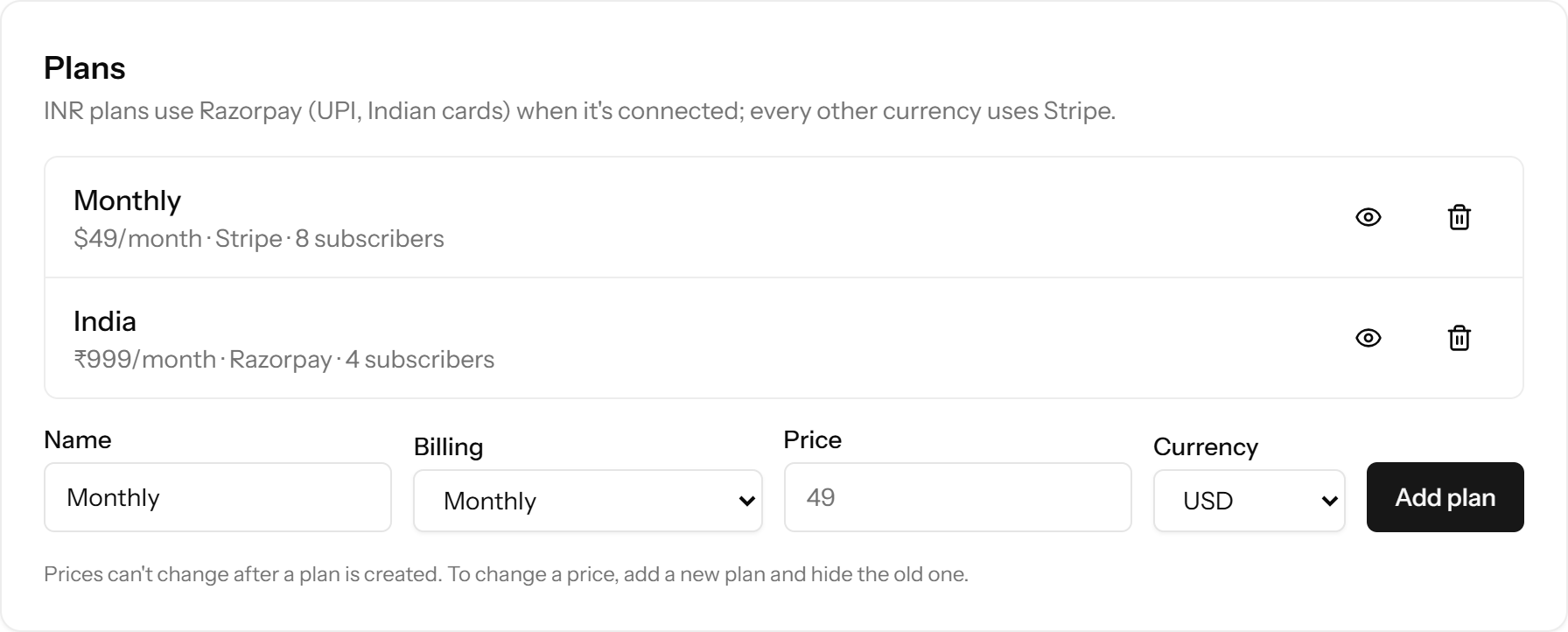
INR and international plans side by side
You can offer both in the same community. A ₹999 a month plan goes through Razorpay, and a $49 a month plan goes through Stripe. Members pick the plan that suits them. If Razorpay keys aren't set, INR plans go through Stripe instead.
Renewals and failed payments
Access is granted as soon as a payment succeeds and removed when a subscription ends. If a renewal fails, the member keeps access for a 3-day grace period while the payment is retried. An hourly job also ends any subscription whose paid period is over, in case a webhook is missed. Members get an email receipt for each payment.
Fees
Razorpay charges its standard fee per transaction; see Razorpay pricing for current rates. OpenEscool adds no fee on top.
Checklist
- Razorpay account activated (KYC done)
- Keys in
.env, thenphp artisan optimize - Webhook added with the listed events
- INR plan created; test it with Razorpay test keys first
- Community switched to Paid
New to self-hosting? Start with the install guide, or read why OpenEscool is a Skool alternative for Indian creators.
Questions
Can members pay with UPI for a monthly membership?
Yes. INR plans go through Razorpay subscriptions, which support UPI along with cards, netbanking and wallets.
What happens if Razorpay keys aren't set?
INR plans go through Stripe instead.
Can I charge in INR and USD in the same community?
Yes. Create one plan in each currency. INR uses Razorpay, other currencies use Stripe.
Does OpenEscool take a cut?
No. You pay only Razorpay's or Stripe's normal fee.
Run it on your own server
Free, open source, and live in about 30 minutes.